Order support for SMM panel owners

From customer request
to provider follow-up.

ControlSMM connects customer requests, panel orders and provider communication in one operational workflow.

WhatsApp groupsTelegram groupsPanel tickets
One request. Two orders.ACTUAL CONTROLSMM UI
Case 2041 contains the speed-up request for orders 731204 and 731205. Both panel orders remain in progress; one request is solved and the other is processing.

One illustrative operation. Real product screens. Fictional data.

THE WORK, CONNECTED

A request has a path.
Keep it connected.

Follow one request from customer message to recorded provider response.

ONE REQUEST · CASE #204101 / CAPTURE

The customer asks.
The work has a home.

A supported request from an accepted customer group becomes a Case.

WhatsApp → ControlSMM
Customer SupportWhatsApp customer group
Cedar Resellers
Please speed up orders 731204 and 731205. Thank you.
CONTROLSMMCase #2041
Original request
kept with the work

Illustrative conversation · fictional data
02 / ORGANIZE

Two orders.
One shared context.

See the requested action, panel progress and the provider behind each order.

Case #2041 → Nimbus Supply
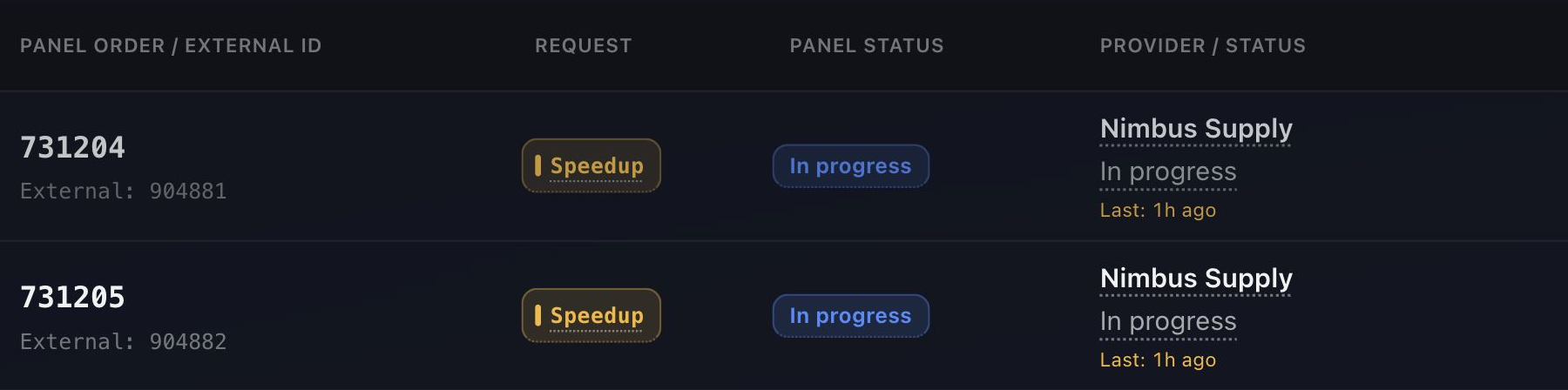
ORDER731204ORDER731205REQUESTSpeedup
Actual Case 2041 order table: 731204 and 731205 both request Speedup, remain In progress on the panel and belong to Nimbus Supply.

Both orders: In progress on the panel · Nimbus Supply

Scroll the table to see the provider →

Real Case view · panel progress and request handling stay separate

03 / COORDINATE

The right provider.
The configured path.

The first order’s speed-up request is sent to Nimbus Supply through Telegram. The second is still queued.

Provider request → Provider response
CONTROLSMMCase #2041Order 731204
Nimbus SupplyTelegram
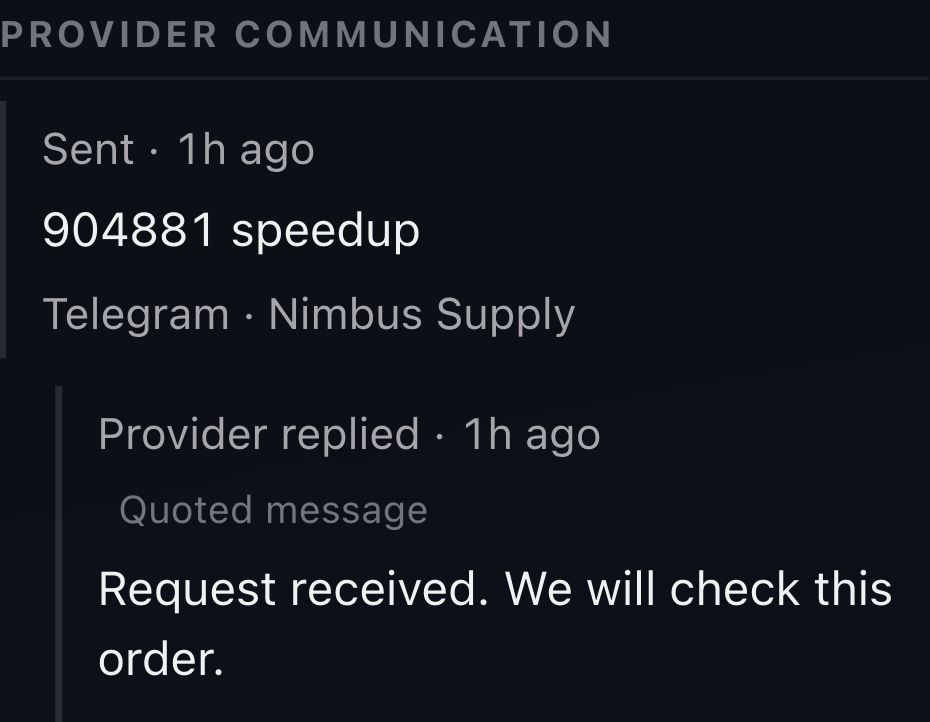
REQUEST SENT · ORDER 731204

904881 speedup

904881 is the provider’s order ID.
NIMBUS SUPPLY REPLIES
“Request received. We will check this order.”
Panel order: In progress
04 / KEEP THE CONTEXT

The reply comes back
to the story.

The recorded response stays with the order in the Case, so your team can see what happened.

Provider response → Case context
Provider responseBack in the Case
Case #2041Cedar Resellers · Order 731204
Actual Order Details in Case 2041 records the Telegram request to Nimbus Supply and its reply: Request received. We will check this order.
Provider communication · actual Order Details

A sent request isn’t a completed order. Panel status shows the order’s progress.

LESS MANUAL COORDINATION

Less chasing.
More handling.

More orders shouldn’t mean more support work.

ControlSMM organizes the repetitive work between requests, orders and providers—so more volume needn’t mean the same increase in manual coordination.

01

Less checking. A clearer next action.

Supported requests become Case work. Related orders and the provider path stay together, cutting the steps between a customer message and follow-up.

02

A leaner operation. People where they matter.

Organize multi-order requests and repetitive coordination in one workflow. Give your team more room for exceptions that need a person.

03

Better follow-through. Less reliance on memory.

See what was sent and what the provider replied. Consistent acknowledgements and a shared record help your team keep customers informed.

Less manual work More team capacity Room to grow

YOUR DAILY OPERATION

See where your
team needs to act.

Cases needing attention stand apart from work already moving. Open one to pick up the full story.

Two ways to see the same work.

Actual Dashboard Cards view: four Cases, two needing attention, including Case 2041 for Nimbus Supply.
Attention first. Context one Case away.Cards view · illustrative workspace

COMMUNICATION WITH CONTEXT

Keep the context. Cut the repetition.

A clear customer update.

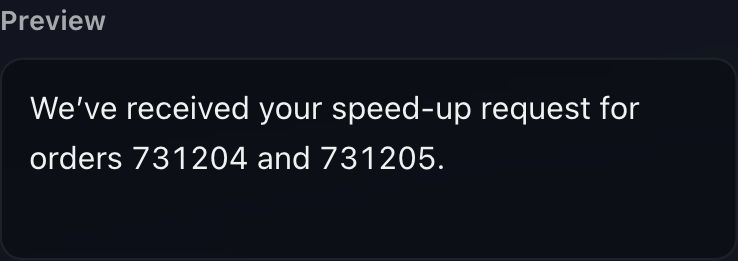
Customize messages for acknowledgements and provider requests.

Actual Message Automation preview: We’ve received your speed-up request for orders 731204 and 731205.
Customer acknowledgement · Message Automation

A shared record, with controlled access.

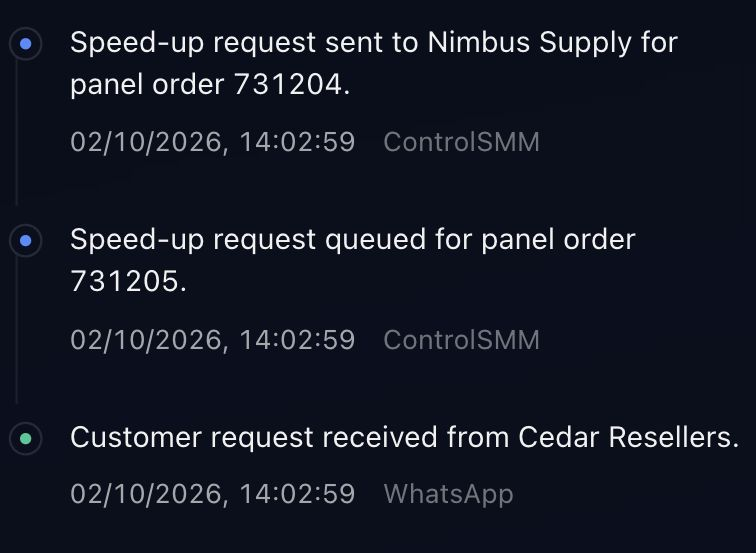
Recorded activity for your team. Permissions determine who can see and act.

Actual Case History records receipt from Cedar Resellers, the queued request for order 731205 and the sent request for order 731204.
Case #2041 · Recorded activity

GETTING STARTED

Start with your panel.
Build around your operation.

Choose one ready request source to get started. Add sources and update provider contacts later.

  1. 01

    Your business

    Name your workspace.

  2. 02

    Your panel

    Connect your order context.

  3. 03

    Customer requests

    Choose where requests arrive.

  4. 04

    Providers

    Set how to contact each one.

BUILT AROUND YOUR OPERATION

Currently onboarding
by invitation.

ControlSMM workspaces are opened by invitation for now.

There is no public sign-up or access request form.

Already invited?

Open the link in your invitation email to join your workspace, or sign in if you already have an account.

Sign in

BEFORE YOU GET STARTED

A few practical questions.

Do I need all three request sources?

No. Setup requires at least one ready source. You can add WhatsApp groups, Telegram groups or panel tickets as your operation needs them.

Does connecting a number authorize every group?

No. You choose and accept the customer groups allowed to create requests. Selecting a group alone does not authorize it. Telegram private messages do not create customer requests.

Can my team contact some providers manually?

Yes. You can configure manual handling where your team contacts the provider, alongside supported WhatsApp and Telegram destinations. Provider API access is separate.

Will ControlSMM work with my panel?

Compatibility with your panel is confirmed before onboarding.