FOR RENTALPANEL PANEL OWNERS
RentalPanel order context.
Alongside the request.
Look up RentalPanel orders in Cases created from WhatsApp, Telegram and manual requests. Keep the customer’s request and order context together as your team coordinates with providers.
No signup required for the demo · Fictional data
RENTALPANEL COMPATIBILITY
Order lookup for chat and manual Cases.
RentalPanel support has a defined scope. It brings order information into Cases; it does not include the ticket and group-verification workflows available with PerfectPanel.
| WhatsApp requests | Look up RentalPanel orders for Cases from supported WhatsApp customer-group requests. WhatsApp connects through WaSenderAPI using linked-device connectivity. This is not the official WhatsApp Business API. |
|---|---|
| Telegram requests | Look up RentalPanel orders for Cases from supported Telegram customer-group requests. |
| Manual requests | Use RentalPanel order lookup when your team creates a request manually. |
| Panel tickets | Not supported for RentalPanel. Do not plan your setup around reading or replying to RentalPanel tickets through ControlSMM. |
| Group verification | Not supported for RentalPanel. Connecting a chat channel does not provide the PerfectPanel ticket-based verification flow. |
FROM REQUEST TO ORDER CONTEXT
Look up the order. Keep the context.
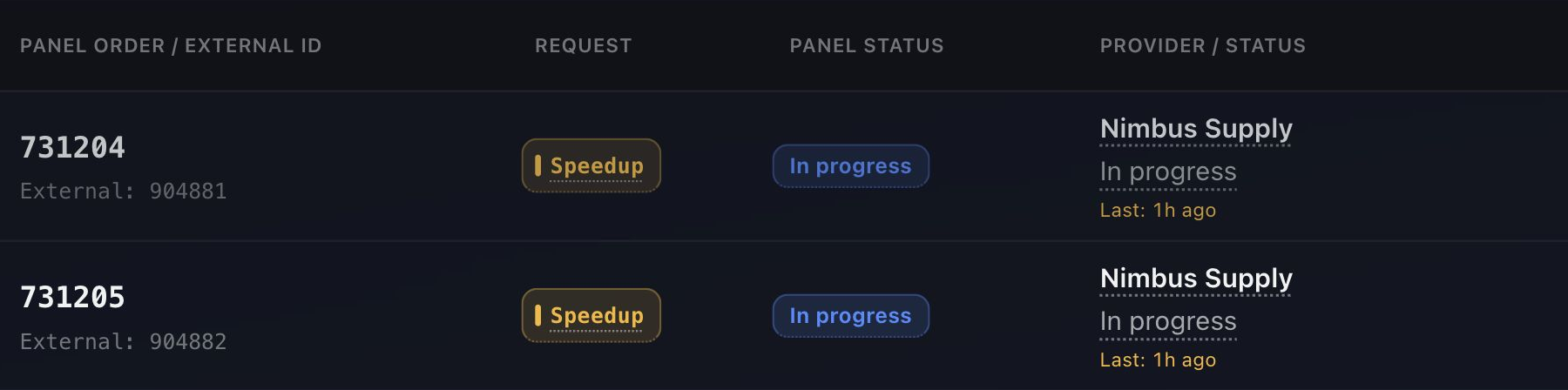
A customer’s order ID is the starting point for investigating the request. The Case gives your team a shared place to follow the work; the panel remains the source of order status.
“Please speed up orders 731204 and 731205.”
A supported WhatsApp or Telegram group request, or a request created manually by your team.
- Use RentalPanel order lookup to add the relevant order context to the Case.
- Coordinate the supported request through the configured provider contact path. A forwarded request is not a panel-side action.
- Review the request’s handling and panel order status separately. A reply from the provider does not establish completion.
Request understanding uses English keywords. It is not multilingual AI. Use a clear supported request and the relevant order IDs; your team remains responsible for reviewing exceptions.
BEFORE YOU CONNECT
Start with RentalPanel API access.
You need an invited ControlSMM workspace, your RentalPanel panel address and an Admin API key. The connection provides order lookup.
Request your Admin API key
Contact RentalPanel support through your registered account and request Admin API access for your panel. The key is issued through RentalPanel’s support process.
Connect your panel in ControlSMM
Enter the panel address and the issued key in the RentalPanel connection, then check the connection. Keep the key private: enter it only in ControlSMM.
Choose WhatsApp, Telegram or manual requests
For WhatsApp, enter the number your customers already message and scan the QR code in ControlSMM. ControlSMM sets up the linked-device session through WaSenderAPI; you don’t need your own WaSenderAPI account. The number must be a member of each customer group. For Telegram, create a bot with @BotFather, paste its token in ControlSMM and add the bot to each customer group as an admin, so Telegram delivers the group’s messages to it. New groups start in Needs review: accept only the groups that may send requests. Manual requests also support RentalPanel order lookup.
Configure provider handling
Add each provider using the exact provider name shown in RentalPanel; automatic provider discovery from recent orders isn’t available for RentalPanel. New providers in orders ControlSMM reads are still detected automatically. Set the supported provider contact paths and decide what your team will handle manually. Finish setup to start request processing. Messages that arrive before setup is finished are not processed later. Then review an example Case to check order context and request handling before relying on the workflow. For a practical method, see how to manage provider follow-ups.
PRACTICAL QUESTIONS
Before you connect.
Can RentalPanel orders be looked up from WhatsApp and Telegram requests?
Yes. ControlSMM supports RentalPanel order lookup for Cases from WhatsApp, Telegram and manual requests. Customer-group and channel setup still need to be configured.
Does RentalPanel support panel tickets in ControlSMM?
No. ControlSMM does not support RentalPanel panel-ticket intake or replies. Panel-ticket workflows are PerfectPanel-only.
Does RentalPanel support group verification?
No. The ticket-based group-verification flow is PerfectPanel-only. This is separate from using WhatsApp or Telegram as a source of RentalPanel requests. Because RentalPanel groups cannot verify, unverified-group order limits apply while Group Verification is on.
Will ControlSMM cancel or refund orders on RentalPanel?
No. ControlSMM forwards supported requests to providers. It does not execute cancellation, refunds, refills or partials on RentalPanel.
Does the demo show features RentalPanel doesn’t support?
Yes. The demo uses fictional data and includes panel-ticket Cases, which are PerfectPanel-only. Use this page and the compatibility table to check RentalPanel scope.
Does request understanding support multiple languages?
No. Request understanding uses English keywords, not multilingual AI. Ambiguous requests are never guessed: your team reviews them, or the customer is asked to clarify.
How do I get access?
Access is by invitation. Public signup is closed and pricing remains private. You can explore the demo without signing up; it does not connect to your real panel.
See the work in a Case.
Explore the interactive demo with fictional data. Access to ControlSMM is by invitation; public signup is closed and pricing is private.
The demo includes panel-ticket Cases, which are PerfectPanel-only.